GPS Tracking Field Employees by Phone: What You Get and What You Don't

Your field employees already carry a GPS tracker: the phone. Before you wire devices into the vans or buy a field service suite for its tracking tab, look at what a phone app can tell you about where your crew was. Look at where it comes up short, too.
We make SpatialFlow, a phone tracking app for field crews with a web dashboard for whoever runs them. It is free for up to 5 phones. These are the questions owners of small crews ask first, answered with our own numbers and checked against app version 1.0.17 in November 2026. Other phone trackers work on the same principles with different limits, so put the same questions to them.
- Each employee starts and stops their own shift in a free app for iPhone or Android. Nothing is recorded off shift.
- You get a live map, the route each person took, a record of every arrival with the time spent on site, and alerts by email, Slack or Microsoft Teams.
- It can tell you which site a phone was at. It can't tell you which room, and a departure after a long stop can register a few minutes late.
- Free for 5 phones with no card. Pro is $49 a month for 15.
Start a free workspace, or read on for the detail.
What does phone tracking tell you?
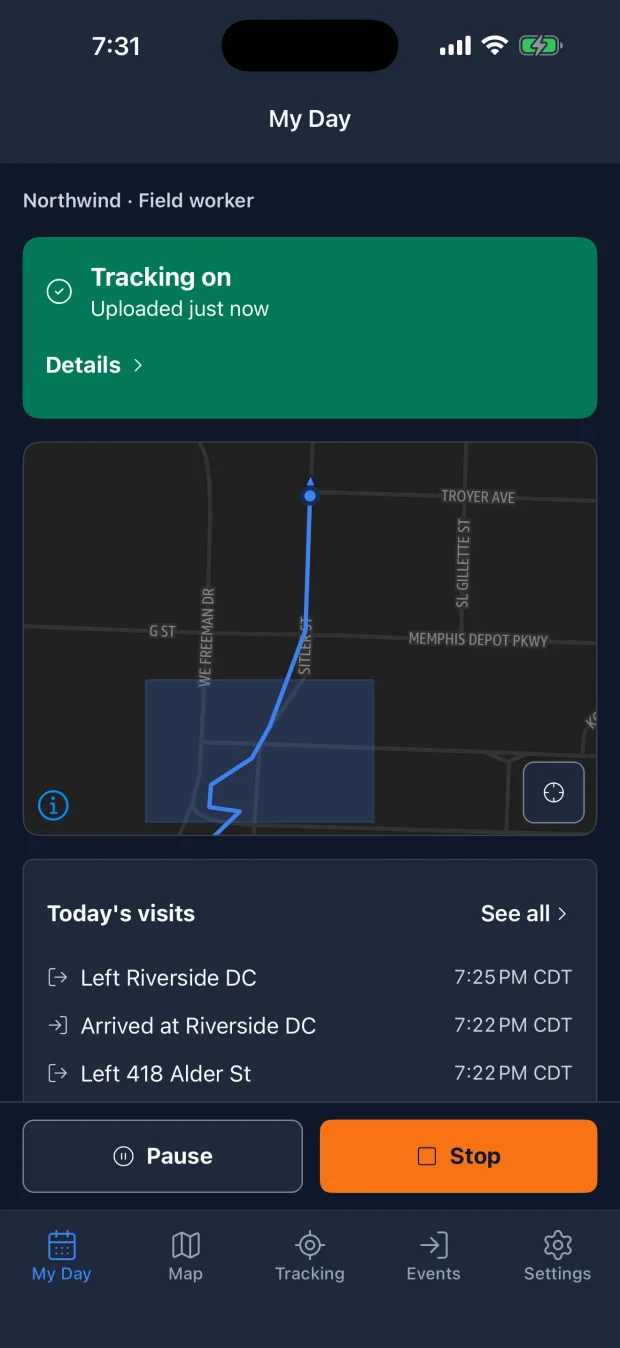
You draw a geofence around each place your crew works, on a map in the web dashboard. Each person starts a shift in the app when their day begins. From then on, a phone crossing into a geofence records an arrival and crossing out records a departure. The time between them is time on site.
Nobody has to text "I'm here". You get:
- A live map of who is on shift and where they are.
- The route each person took on a shift, drawn on the map with the time they entered and left each site.
- A record of every visit: which site, when they arrived and how long they stayed.
- Alerts. A rule can email you, post to Slack or Microsoft Teams, or notify another system through a webhook when someone arrives, leaves, stays past a time you set, or doesn't reach a site inside a daily window.
- Notes and photos an employee adds during a shift.
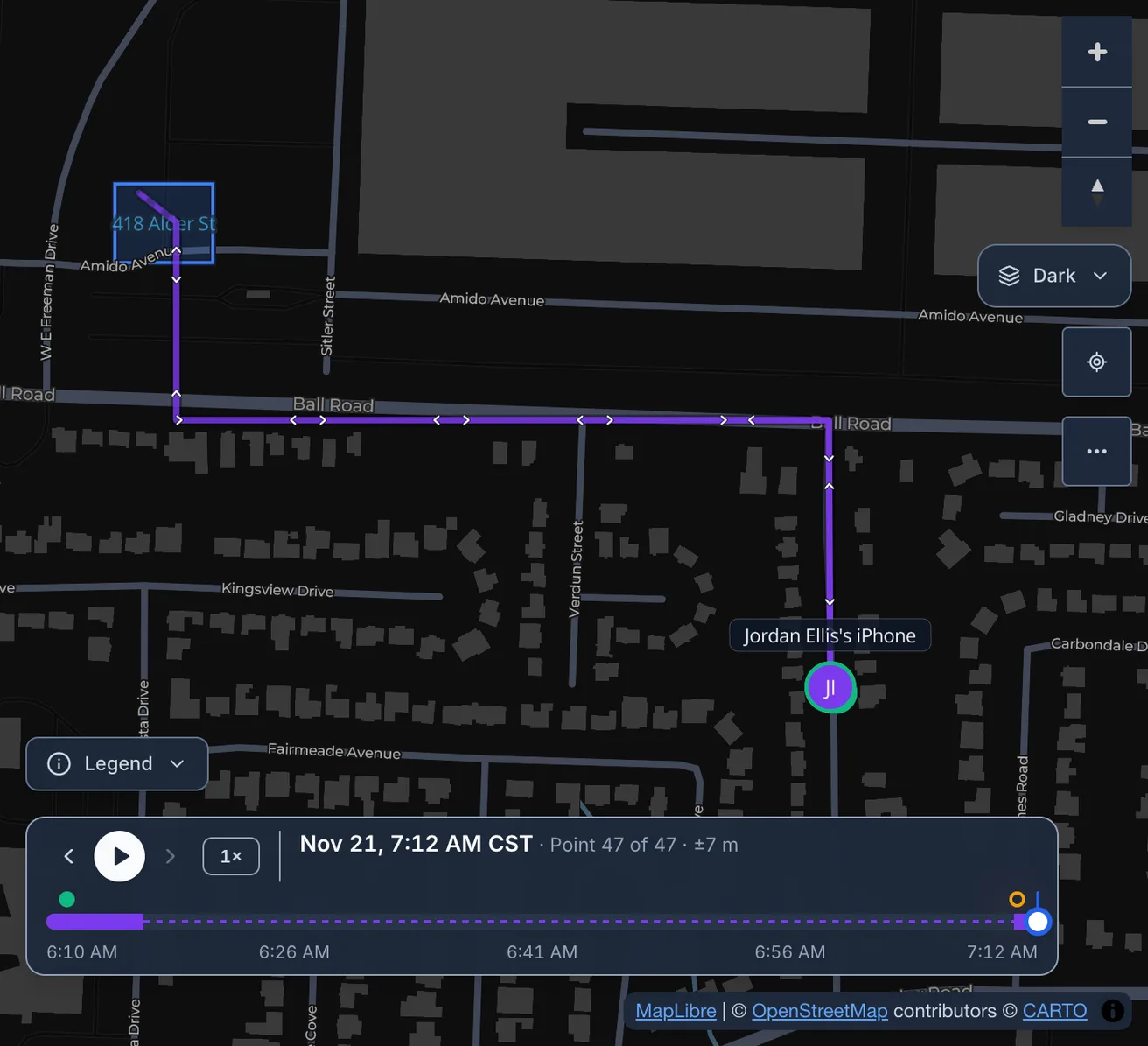
For a cleaning company, that answers whether the night crew reached each building and stayed the contracted two hours. A service shop gets a message when a tech pulls up to a job. A patrol company can check that a guard's phone passed each stop on the round.

The reports cover time on site, attendance, trips, mileage and idle stops, and each one downloads as a CSV.

You can try this with up to 5 phones for free. The last section covers the first setup.
Does phone tracking follow employees after hours?
No. The app collects location only between Start and Stop, and the employee taps both. A manager can't switch tracking on for someone. During a shift the employee can pause for a break, and nothing is recorded until they resume.
The server enforces the same rule. It refuses positions stamped outside a shift or during a pause, including ones a phone sends later after being offline.
The phone makes tracking visible. Android shows a "Tracking Active" notification for the whole shift, and iOS shows its blue location indicator while the app runs in the background. In the app, an employee sees their own position and visits. Managers and owners see the whole crew.
One caveat: a shift someone forgets to stop keeps running. You can set a rule that alerts you when a shift passes a number of hours, and the server closes a shift that has sent nothing for 24 hours.
How accurate is phone GPS tracking?
Accurate enough to say which site someone was at and for how long. It can't tell you which room.
- While a phone is moving, the app records a position about every 15 meters (50 feet).
- A position the phone rates as worse than 100 meters (330 feet) is discarded, so one bad reading inside a building can't invent an arrival.
- Small sites get a floor. For a geofence smaller than a circle with a 50 meter (165 foot) radius, a phone within 50 meters of it counts as inside. Phone GPS can't reliably separate two neighboring storefronts.
- Reports leave out a pass through a geofence that lasts under 60 seconds, so driving past a site isn't a visit. An arrival alert still fires on the entry itself.
GPS is weaker indoors and between tall buildings. Draw each geofence around the property your crew works on, parking included, and leave single doors alone.
What happens when the phone is parked or has no signal?
A parked phone or a dead zone doesn't cost you the visit record, as long as coverage returns within a day. Two things can run late: a departure after a long stop, and any alert for a stretch without coverage.
A phone that sits still stops running its GPS, which is most of why the battery survives a shift. After five minutes without movement, an iPhone stops reporting positions until it senses that it has moved. An Android phone drops to a low-power position check once a minute.
Time-on-site alerts don't wait for the phone, because the server counts each person's time inside a geofence once a minute, so "on site longer than 90 minutes" goes out on time. A departure after a long stop can register late, though. In one test drive, an Android tablet that had been parked overnight recorded its first moving position between two and three minutes after pulling out. Treat a departure time after a long stop as accurate to within a few minutes.
Without signal, the phone stores up to 10,000 positions or one day of them, whichever comes first, and uploads them when coverage returns. Each keeps the time it was recorded. The visit record ends up complete, but an alert for that stretch arrives late.
Does GPS tracking drain the phone's battery?
Parked, hardly at all. An Android 12 tablet running 1.0.17 sat still through a 10-hour 42-minute night with a shift on, the screen off and Wi-Fi connected, and went from 100 to 97 percent. That works out to about 2.3 percent per 8 hours, and it is the whole tablet's drain, including everything else running on it.
A moving phone uses more, since GPS runs at high accuracy while it moves. The nearest thing we have to a working day comes from the previous version, 1.0.16: the same tablet went from 100 to 95 percent in about six hours that included 95 minutes of driving. We haven't measured a full driving day on 1.0.17, or an iPhone, and we'll add those figures when we have them.
One setup step matters on Android. The app asks once to be exempted from battery optimization. If the employee skips that, Android may pause tracking partway through a shift.
Can an employee switch tracking off or fake a location?
They can switch it off. Pause and Stop are theirs to tap, and anyone can revoke location access or let a phone die. You will see it: the live map marks a phone as needing attention when it is on shift, not parked, and has sent no location for 15 minutes. A rule can also alert you when an on-shift phone goes quiet for longer than you allow.
SpatialFlow doesn't detect a phone running a fake-GPS app, though. The record shows where a phone said it was. It also follows the phone, so a phone left on the dashboard reports the van.
What doesn't a phone tracking app do?
It isn't payroll software. The attendance report lists when each shift started and ended, as a CSV, and it doesn't handle breaks, overtime rules or a payroll export.
Checkpoint scanning isn't included. There are no NFC tags or QR codes, so a geofence can show that a phone reached an area and nothing more about a specific door.
It knows nothing about the vehicle. Engine hours, odometer readings and harsh braking need hardware in the van, and the mileage report is the distance the phone traveled.
Planning the day happens in other tools. Scheduling, dispatch, routing and invoicing are outside it, and SpatialFlow reports where people were.
How does a phone app compare with vehicle trackers and time clocks?
| Tool | What it follows | Fits when |
|---|---|---|
| Phone tracking app | The person, during a shift | The work happens at sites, on foot or by vehicle |
| Vehicle GPS tracker | The vehicle, all the time | The vehicles are what you need to watch |
| Time-clock app with GPS | Where someone was when they clocked in or out | Payroll is the problem |
| Field service suite | The job: schedule, dispatch, invoice | You want one system to run the business |
Only the vehicle tracker needs hardware, a device in each vehicle, and it usually bills per vehicle per month, often on a contract. Time-clock apps and field service suites usually bill per user per month, and some time-clock apps are free for small teams.
A vehicle tracker stops knowing where your tech is once they step out of the van, and a time clock knows only the moments they clocked in and out. A phone app covers the hours between, as long as the employee starts the shift.
Is tracking employees' phones legal, and do I need their consent?
It depends on where you are, and this section covers only the United States. Whatever your state requires, tell your employees in writing before the first shift. Say what is recorded, that it happens only on shift, who can see it and how long it is kept.
Some states require written notice of specific kinds of monitoring. New Jersey requires it before an employer uses a tracking device in a vehicle an employee drives (N.J.S.A. 34:6B-22). New York requires written, acknowledged notice of electronic monitoring of phone, email and internet use (Civil Rights Law 52-c). Whether rules like these reach a phone app in your situation is a question for an employment lawyer, and none of this is legal advice.
What about employees' personal phones?
Personal phones are the harder case. An employee's own phone goes home with them, so it matters more that tracking stops when the shift does, that the employee holds the switch, and that they have signed your notice.
What the app tells the employee
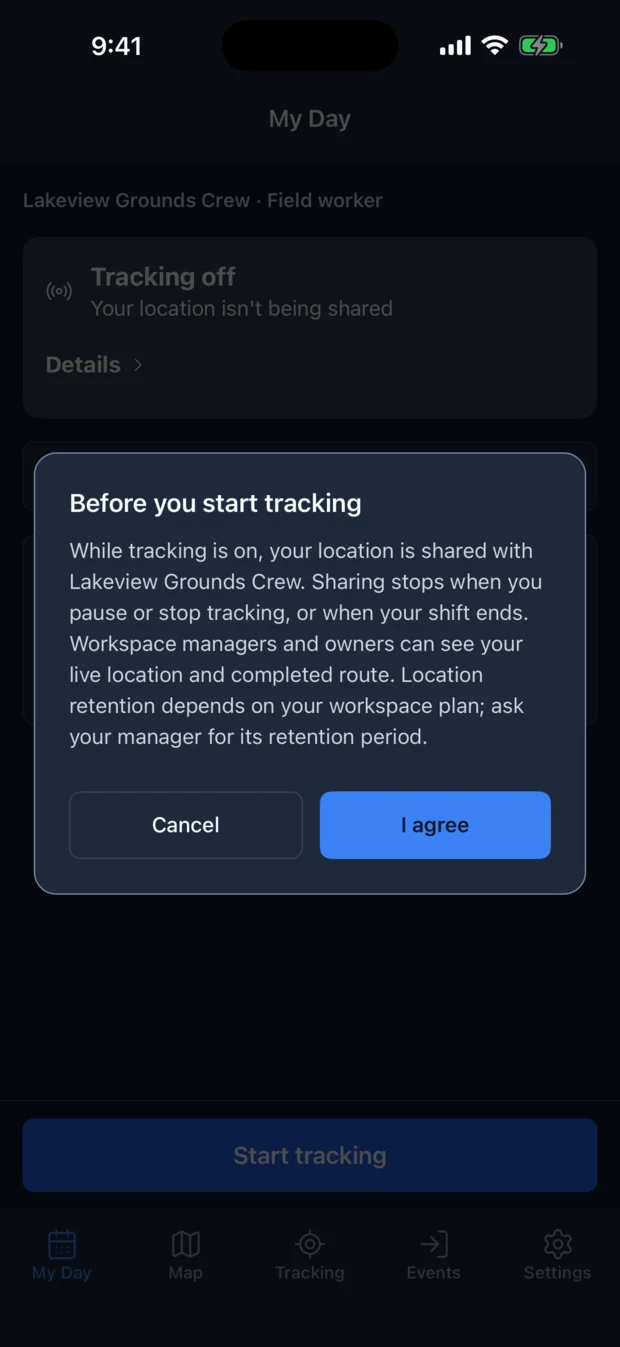
The app helps with part of this. The first time someone starts tracking in your workspace, it tells them who can see their location and asks them to agree. That dialog is a disclosure from the app. Your own written notice is still your job. The field worker guide spells out what is collected and who sees it in plain terms you can hand to your crew.
How long is the location data kept?
On the free plan, individual positions are deleted after 30 days. Pro keeps them for 90. After that, a simplified line of each finished route remains, along with the shift record: when it started, when it ended and how far the person traveled.
What does phone tracking cost?
SpatialFlow charges by plan, each plan caps the number of phones, and there is no hardware to buy. These are the prices in November 2026.
The free plan covers 5 phones, 10 geofences, 2 active workflows (the alert rules described above) and 30 days of history, and you don't need a card to start a free workspace. Pro costs $49 a month for 15 phones, 100 geofences, 10 active workflows and 90 days of history. The pricing section lists the larger plans.
Text message alerts go through your own account with Twilio, a text messaging service, which bills you separately.
Try it on one site
- Start a free workspace on the web, draw a geofence around one job site, and invite one person by email or QR code. They get the app from the invitation.
- The field service tracking page shows arrivals and time on site for a service crew, and our earlier post covers how shift-based tracking works.
- The alerts guide walks through arrival, missed check-in and offline alerts.
Questions about your setup? Reach us at support@spatialflow.io.