What a Geofence Can and Can't Prove About Truck Detention

Nearly every carrier charges detention. Collecting it is harder. In ATRI's 2024 detention study, carriers overall invoiced customers for 75 percent of detention incidents, and only 55 percent of those invoices were paid. Truckload carriers ended up paid for 43.5 percent of their detention incidents. Reefer carriers got 36 percent.
A geofence won't fix all of that. In SpatialFlow, it records when every truck arrives and leaves, workflows tell dispatch when the clock starts and when free time runs out, and a report adds up what each stop is worth. This post walks through that setup, and then the part a timestamp can't settle.
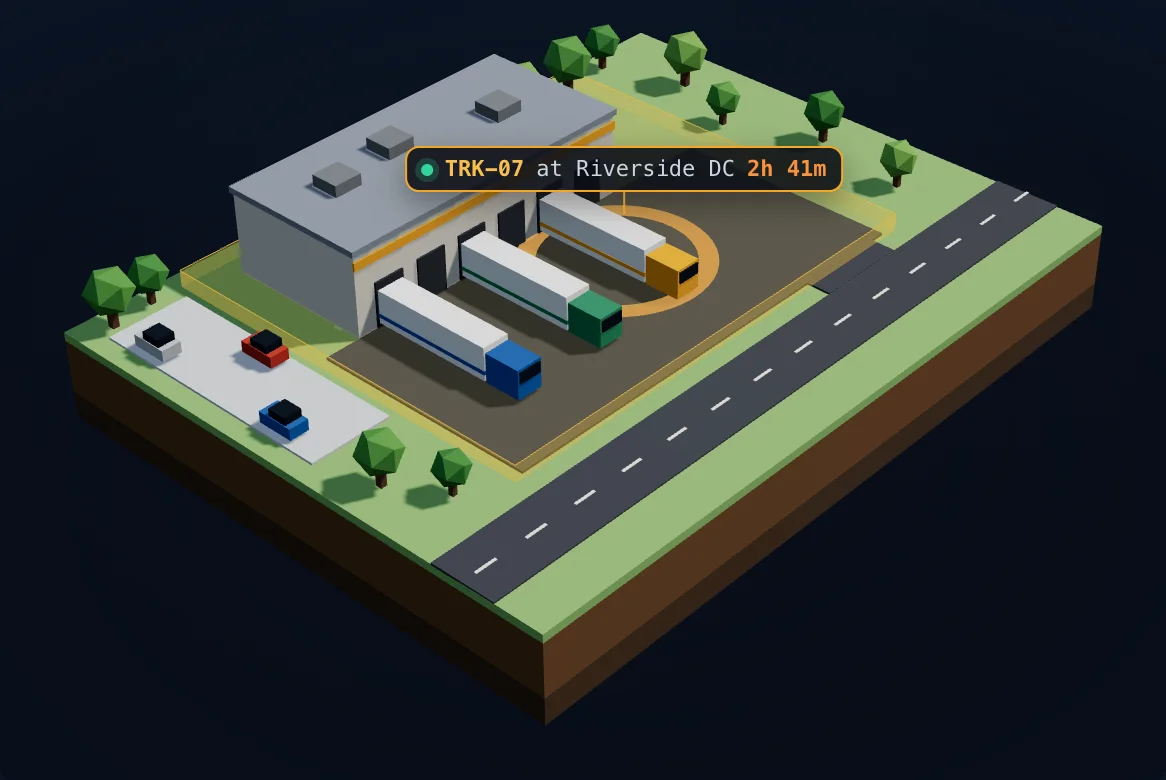
- TRK-07 enters Riverside DC and the clock starts.
- Slack #dispatch: TRK-07 arrived at Riverside DC at 09:00. Free time is 2 hours.
- Free time is up. Detention starts.
- Slack #dispatch: TRK-07 has been at Riverside DC for 2h 00m. Detention starts now.
- TRK-07 leaves Riverside DC.
- 3h 15m on site, 1h 15m over free time: $93.75 at $75/hr
Where the money leaks
ATRI's numbers show two separate leaks. About a quarter of detention incidents are never billed at all. Of the invoices that do go out, close to half are never paid, and the report doesn't break down why.
The first leak is the one a carrier controls. Whatever the reason a stop goes unbilled, it's harder to bill when nobody wrote the times down, and a three-hour wait gets fuzzy fast once the load delivers. The second leak comes down to contracts and leverage. Better timestamps help there too, but they don't decide it.
The clock starts at the gate
Draw a geofence around the facility: the gate, the yard and the docks. You don't need hardware in the truck. The driver runs the SpatialFlow app for iOS or Android during a shift. When the phone crosses into the zone, SpatialFlow records the arrival, and when it leaves, the departure.
The reports don't count a pass through a zone that lasts under a minute as a visit, so a road that clips the corner of a geofence won't invent stops. The shape of the zone is a judgment call, though. If trucks queue on the street before the gate, decide whether that wait belongs inside the line before you draw it.
If your trucks deliver to different receivers every week, you don't have to draw each one by hand. On Pro and above, Import on the Geofences page turns a CSV of addresses from your TMS into geofences, up to 500 at a time. Give them one tag, and a single workflow can watch every geofence with that tag, so a new receiver is covered as soon as it's tagged. The free plan holds 10 geofences, enough to try it on the receivers where you wait the longest.
Tell dispatch when the clock starts
Accurate times help with the invoice. Knowing in time helps with everything else, like calling the receiver, telling the broker, or replanning the driver's next load. Some rate confirmations also ask the carrier to notify the broker when a truck is close to detention.
A workflow handles the alert. This one listens for trucks entering the Riverside DC geofence. When one arrives, it posts to the dispatch channel in Slack and logs the arrival in the TMS through a webhook.
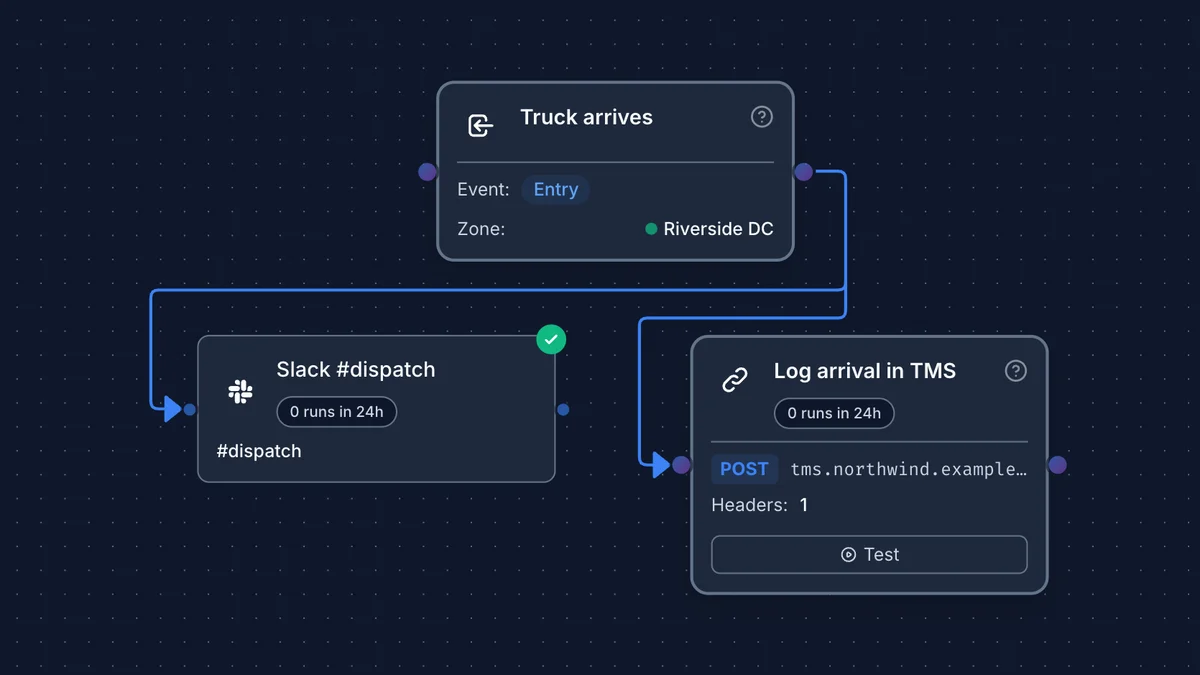
The Slack message is a template filled in from the trigger:
{{trigger.device_name}} arrived at {{trigger.geofence_name}} at {{trigger.timestamp_local}}. Free time is 2 hours.
That comes out as "TRK-07 arrived at Riverside DC at 09:00. Free time is 2 hours." Times use the workspace's time zone and a 24-hour clock. The workflow docs cover the other time and duration variables.
A second workflow watches the clock. Its trigger is a dwell on the same geofence, set to your free time. When a truck has been inside that long, it posts again:
{{trigger.device_name}} has been at {{trigger.geofence_name}} for {{trigger.dwell_threshold_display}}. Detention starts now.
That reads "TRK-07 has been at Riverside DC for 2h 00m. Detention starts now." If your rate con wants the broker warned before detention starts, set the dwell a little short of free time, say 105 minutes.
A parked iPhone stops sending locations to save battery until the truck moves again. SpatialFlow doesn't wait for it. It checks each truck's time on site against your dwell triggers once a minute, so the alert goes out within about a minute of free time running out.
Slack is one option. Either workflow can send an email instead, post to Microsoft Teams, or send a text message through your own Twilio account.
Turn the wait into a number
The Detention tab under Reports lists every visit with its arrival, departure, time on site, time over free time and the amount owed. Enter your free time, which defaults to 120 minutes, and your hourly rate. Filter by truck, group or facility, then download the CSV to attach to an invoice. The free plan keeps 30 days of history, so export it when you bill, not when a dispute comes in.
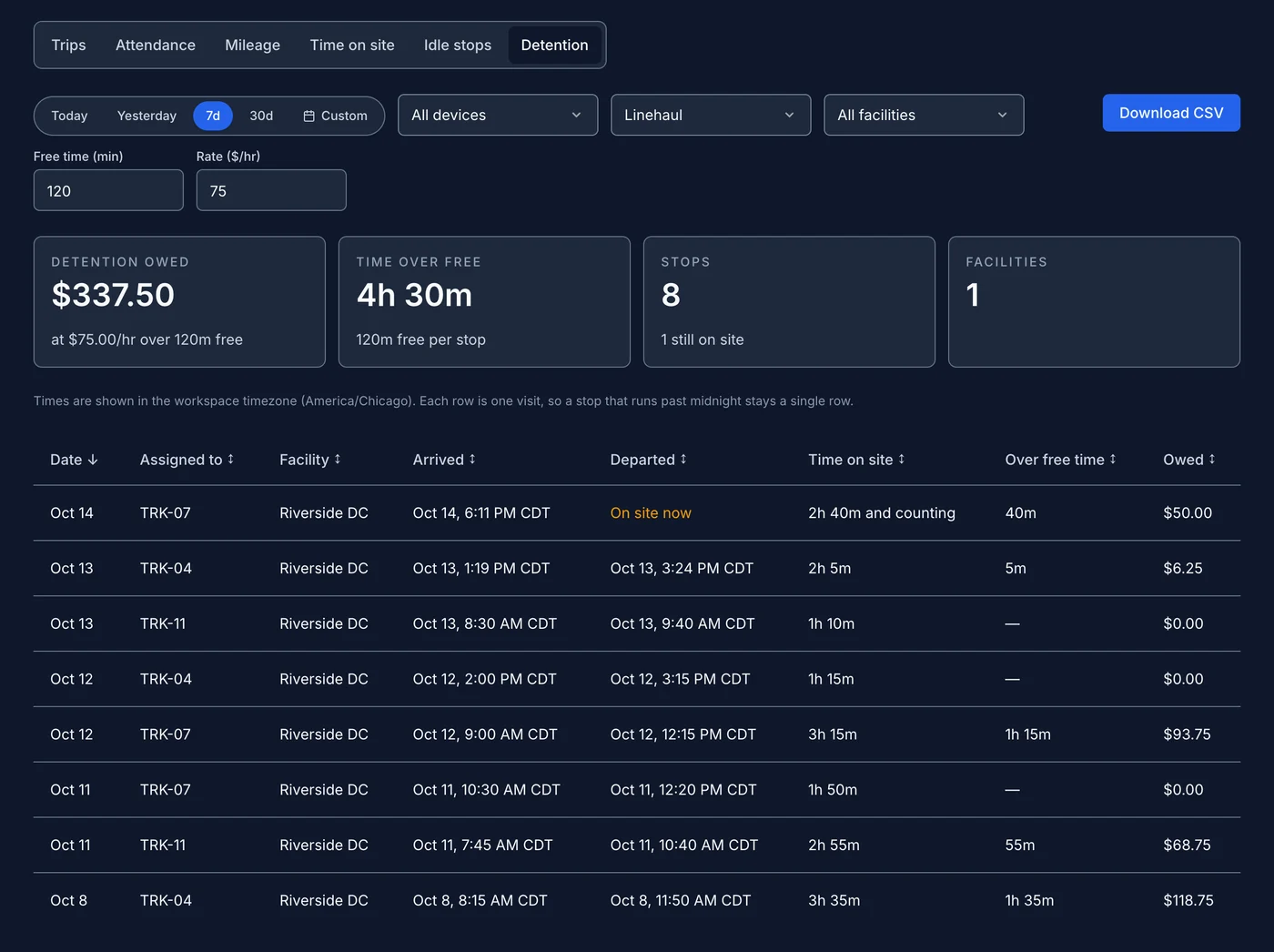
The total only counts what the data supports. If a phone goes quiet for more than six hours and no departure is recorded, that stop comes out of the total and shows up separately as "at least" the time the phone did see. If a departure was never recorded but the truck came back later, the stop is capped at the return and shown as "at most" that amount, also outside the total. Neither one is counted as if it were measured.
What a geofence can't prove
When the clock started under your contract. Your rate con decides that. Often it's the appointment time or check-in, not the moment you pulled into the yard, and showing up three hours early for a 10:00 appointment doesn't earn three hours of detention. SpatialFlow measures time inside the zone. It doesn't know your appointment, so read its arrival times next to the appointment on the rate con.
That the receiver held you. A timestamp shows the truck was there. The rate con and the signed BOL with in and out times decide what gets paid. The GPS record backs them up.
Time it didn't see. If the phone died or the driver ended the shift before leaving, there's no departure on record. As described above, the report keeps that stop out of the total instead of guessing.
Treat the geofence times as backup for the BOL. They're most useful when the BOL times get disputed or the paperwork comes back incomplete.
Try it on your own stops
- Start a free workspace, draw a geofence around a facility you deliver to, and invite a driver by email or QR code to start a shift in the app.
- Want to see it on your own numbers first? Send us last month's stop or ELD export and we'll work out what detention cost you. Ask for a sample detention report.
- The Reports guide covers each report, its filters and the CSV download.
Questions about your setup? Reach us at support@spatialflow.io.